In my previous article, I explored SQL injection using OWASP Juice Shop. I started with something deceptively simple: a single quotation mark.
That exercise helped me understand how user input could change the structure of an SQL query. I experimented with OR 1=1, looked at how SQL comments worked, and eventually completed the Login Admin challenge.
But SQL injection goes beyond bypassing authentication.
This time, I wanted to understand something different: how could an attacker use SQL injection to manipulate the results returned by a database query?
That led me to UNION-based SQL injection.
Understanding the UNION operator
Before experimenting with SQL injection, I wanted to understand what UNION actually does.
In SQL, the UNION operator combines the results of two or more SELECT statements into a single result set.
Imagine we have two tables.
Customers
id | name |
|---|---|
1 | Alice |
2 | Bob |
Employees
id | name |
|---|---|
3 | Charlie |
4 | David |
We can combine their results using:
SELECT id, name FROM Customers
UNION
SELECT id, name FROM Employees;
The database returns a combined result:
id | name |
|---|---|
1 | Alice |
2 | Bob |
3 | Charlie |
4 | David |
There are two important requirements when using UNION:
Both SELECT statements must return the same number of columns.
Corresponding columns must have compatible data types.
Another detail worth remembering is that UNION removes duplicate rows by default. If we want to retain duplicates, we can use UNION ALL instead.
On its own, UNION is simply a way of combining query results. However, when an application constructs SQL queries using untrusted user input, it can become a way to retrieve information that the original application never intended to expose.
What makes UNION-based SQL injection possible?
Imagine an application has a product search function that executes the following query:
SELECT id, name, description
FROM Products
WHERE name LIKE '%apple%';
The application takes a search term supplied by the user and inserts it directly into the SQL statement.
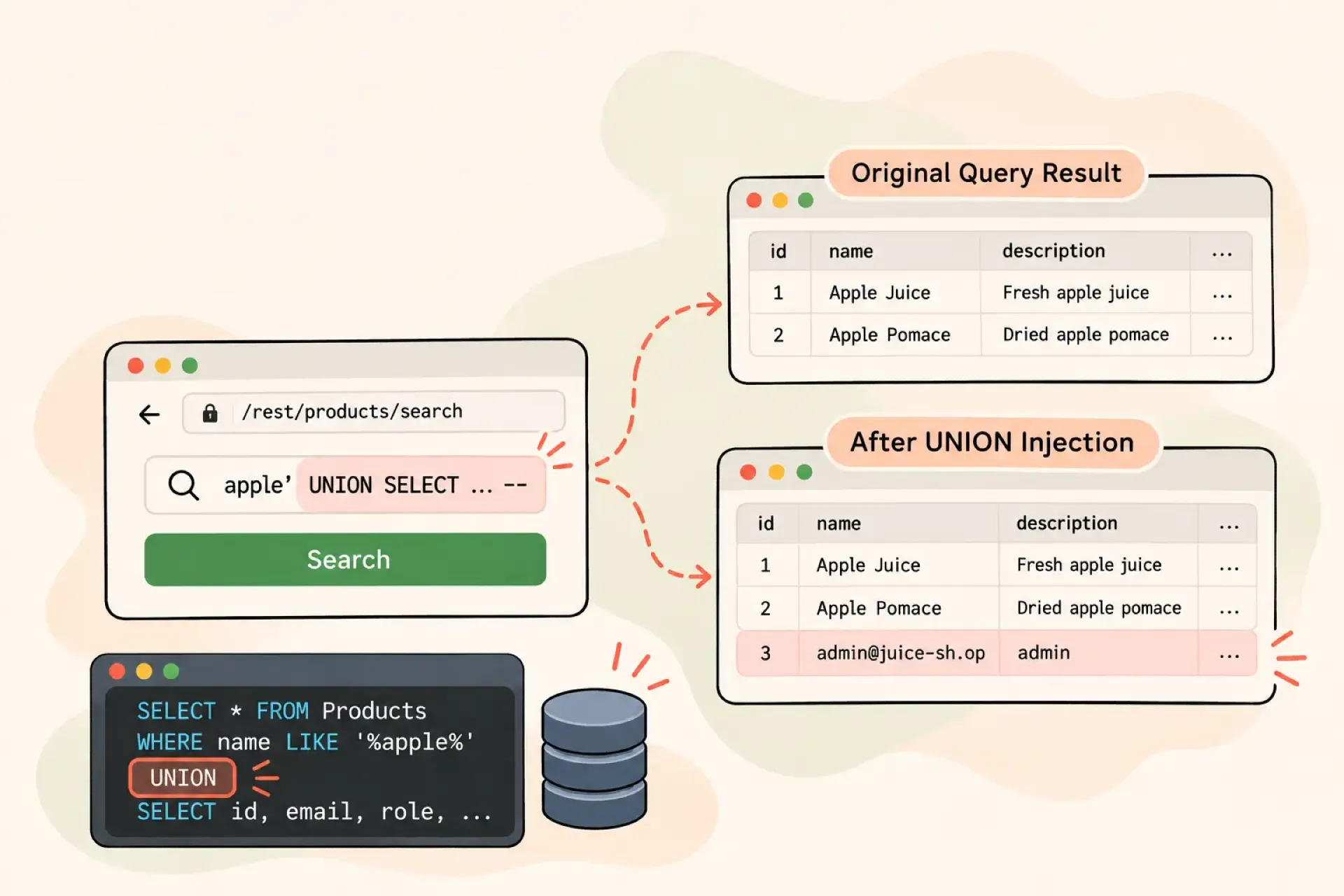
If the application does not properly handle user input, an attacker may be able to alter the original query and append another SELECT statement using UNION.
Conceptually, the resulting query could look like this:
SELECT id, name, description
FROM Products
WHERE name LIKE '%apple%'

UNION

SELECT id, username, email
FROM Users;
Instead of returning only product information, the combined result could contain information from another table.
Of course, this is a simplified example. The injected SELECT statement must satisfy the requirements of the original query, including the number of columns and compatible data types.
That was what I wanted to investigate using OWASP Juice Shop.
Looking at the vulnerable search function
I continued using my local installation of OWASP Juice Shop.
This time, instead of the login endpoint, I focused on the product search functionality.
When I searched for a product, the application sent a request to:
http://localhost:3000/rest/products/search?q=appleThe server returned product information in JSON format.
I wanted to understand how the application generated those results, so I started examining its source code.
I eventually found the relevant query:
SELECT *
FROM Products
WHERE (
    (
        name LIKE '%${criteria}%'
        OR description LIKE '%${criteria}%'
    )
    AND deletedAt IS NULL
)
ORDER BY name;
There it was.
The search criteria were inserted directly into the SQL statement using string interpolation.
In other words, the application was constructing SQL by combining its query with the value supplied by the user.
This was the same fundamental problem I encountered in my previous SQL injection exercise.
However, this time I wanted to understand how I could manipulate the result set rather than simply change the conditions of the query.
Finding the number of columns
One of the requirements for a successful UNION operation is that both SELECT statements must return the same number of columns.
But how could I determine how many columns the original query returned?
I started experimenting with ORDER BY.
In SQL, ORDER BY can reference a column by its position in the SELECT result.
For example:
SELECT id, name, description
FROM Products
ORDER BY 1;
This sorts the results using the first selected column.
Similarly:
SELECT id, name, description
FROM Products
ORDER BY 3;
Sorts the results using the third selected column.
However, if I attempted to order by a column position that did not exist, SQLite would return an error.
I experimented with different column positions in Juice Shop.
ORDER BY 3 worked.
But when I tried ORDER BY 11, SQLite returned:
1st ORDER BY term out of range -
should be between 1 and 10
This was an interesting discovery.
The error indicated that the original query returned ten columns.
Now I had something useful to work with.
Instead of randomly guessing how many columns the UNION statement needed, I had an indication of the original query's structure.
It was a small discovery, but an important one. Understanding the structure of the original query is a necessary step when investigating UNION-based SQL injection.
Why getting UNION injection to work isn't straightforward
At this point, I understood the basic requirements:
The original query returned ten columns.
The injected SELECT statement would also need to return ten columns.
Corresponding columns needed compatible data types.
However, getting everything to work was more complicated than I initially expected.
My first attempts produced SQLite syntax errors.
One attempt resulted in:
SQLITE_ERROR: near "%": syntax errorAnother returned:
SQLITE_ERROR: ORDER BY term out of rangeI initially thought the problem was with the UNION statement itself.
But looking at the original query again, I realised that I needed to account for its surrounding parentheses, quotation marks and the fact that the search criteria were interpolated twice.
A payload that works against a simple SELECT statement might not work against a more complicated query.
The structure of the original SQL matters.
I had managed to establish the column count, but I hadn't yet managed to execute a successful UNION injection against this particular search endpoint.
Rather than keep guessing, I decided it was worth taking a step back and understanding exactly how the original query was constructed.
Sometimes, understanding why something fails is just as valuable as getting it to work.
Looking at it from a developer's perspective
As a Laravel developer, this exercise made me think about how I write database queries.
Laravel's query builder provides parameter binding, which separates SQL statements from user-supplied values.
For example:
$products = DB::table('products')
    ->where('name', 'like', '%' . $criteria . '%')
    ->get();
The value supplied through $criteria is bound as a parameter rather than directly inserted into the SQL statement.
This is fundamentally different from constructing SQL through string interpolation.
When working with raw SQL, we should also use parameter bindings rather than concatenating untrusted input.
For example:
$products = DB::select(
    'SELECT * FROM Products WHERE name LIKE ?',
    ['%' . $criteria . '%']
);
The database receives the SQL structure separately from the parameter value.
This makes it much harder for user input to become executable SQL syntax.
Of course, parameter binding does not automatically make every database operation safe. Developers still need to be careful when dynamically constructing SQL fragments, particularly table names, column names and sorting directions, which generally cannot be handled as ordinary bound values.
But using parameterized queries appropriately is one of the fundamental defences against SQL injection.
Learning beyond the vulnerability
I started this exercise wanting to understand UNION-based SQL injection.
Along the way, I learned more about how SQL combines result sets, why column counts matter, and how SQLite responds when a query references a column that does not exist.
I haven't successfully completed the UNION injection experiment yet.
But I think that's part of learning.
I have spent years building applications, working with Laravel and writing database queries. Yet building software and understanding how it can be exploited are two different skills.
Working through OWASP Juice Shop has been a useful way to bridge that gap.
There are still plenty of things I want to investigate, including how an injected query can expose information from other tables and how the database processes the resulting rows.
For now, I have another small piece of the puzzle.
And perhaps the most important lesson remains the same as my previous experiment:
Don't just learn which input works. Learn why it works.
That's where understanding begins.
This exercise was performed against a local instance of OWASP Juice Shop, an intentionally vulnerable application designed for security training. Security testing should only be performed on systems you own or have explicit permission to assess.