I’ve been a PHP developer for years. I work with Laravel, databases, and application logic every day. But knowing how to build applications doesn’t automatically mean I fully understand how they can be broken.
Recently, I decided it was time to learn more about web security.
Rather than just reading about vulnerabilities, I wanted to get my hands dirty and see how they actually worked. I set up OWASP Juice Shop locally on my Mac and started exploring its security challenges.
My first goal was to understand SQL injection.
Learning in a safe environment
OWASP Juice Shop is an intentionally vulnerable web application designed for security training. It provides hands-on challenges that demonstrate common web application vulnerabilities.
I started with the login page.
One of the challenges, Login Admin, required me to log in using the administrator’s account.
I entered an ordinary email address and password, submitted the form, and inspected the request using my browser’s developer tools.
The request was sent to:
http://localhost:3000/rest/user/login
It was a POST request containing a JSON payload:
{
  "email": "john@example.com",
  "password": "1234"
}
The server returned a 401 Unauthorized response.
Nothing surprising there. I hadn’t supplied valid credentials.
But I wanted to understand what happened when the application processed those inputs.
Looking at the SQL query
The application returned an error that revealed the SQL query it had attempted to execute.
The query looked roughly like this:
SELECT * FROM Users
WHERE email = 'john@example.com'
AND password = '...'
AND deletedAt IS NULL;
The password shown in the actual query was hashed, rather than appearing as the plain-text password I had entered.
In plain English, the query was asking the database to find a user whose email and password matched the supplied values and whose account hadn’t been deleted.
All those conditions needed to be satisfied.
The database evaluates the expression like this:
A: Credentials Match | B: 1 = 1 | A OR B |
|---|---|---|
TRUE | TRUE | TRUE |
FALSE | TRUE | TRUE |
Because B is always true, the overall condition evaluates to true for every row.
That was when I started thinking about what might happen if user input could change the structure of the query instead of simply supplying a value.
That is the fundamental idea behind SQL injection.
When user input becomes SQL
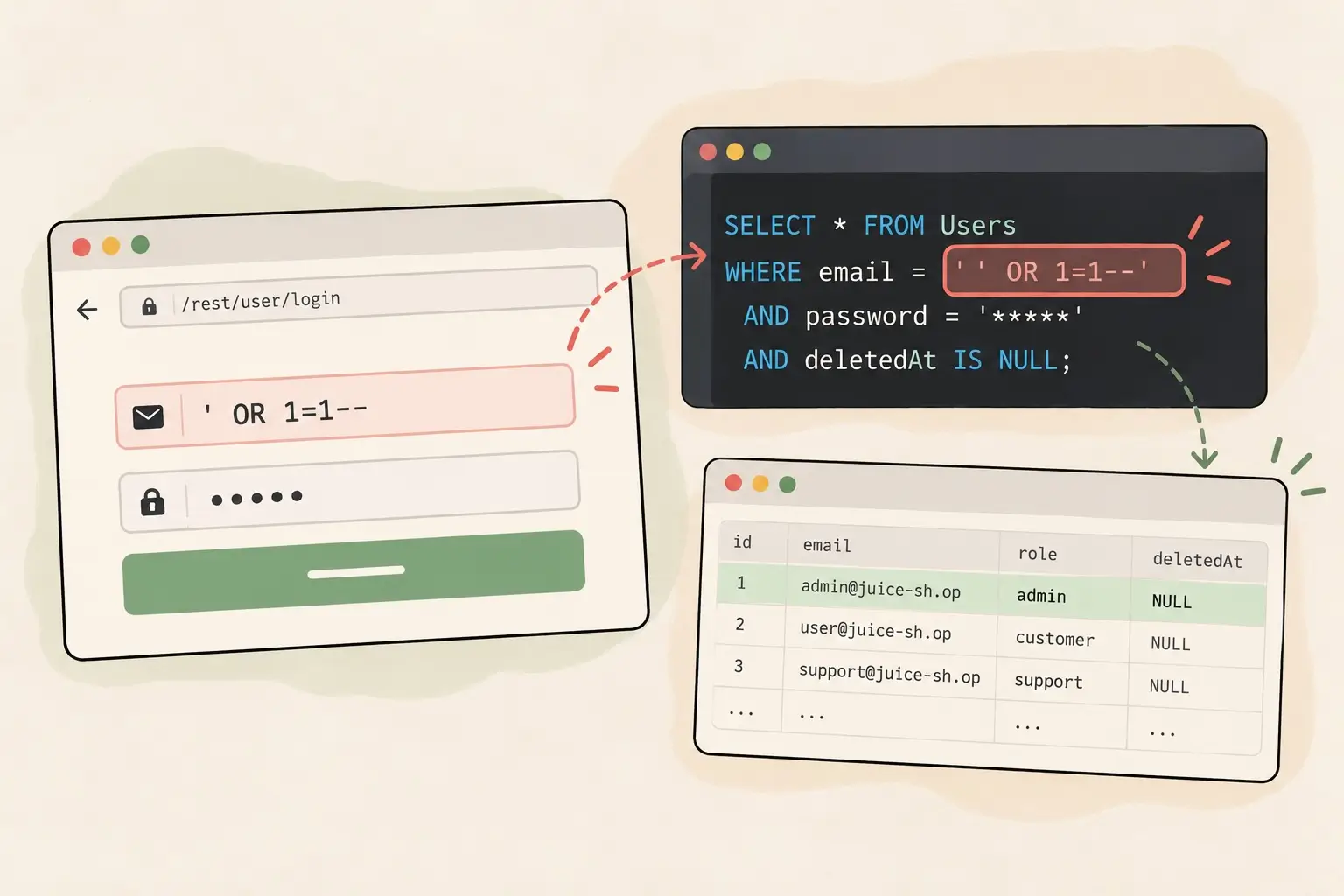
While working through the challenge in my local training environment, I experimented with the login form.
I entered the following value into the email field:
' OR 1=1--It looks like a strange collection of punctuation and SQL keywords. To understand why it worked, I had to examine how the application combined my input with its SQL query.
The application was effectively constructing a query like this:
SELECT * FROM Users
WHERE email = '<email input>'
AND password = '<password value>'
AND deletedAt IS NULL;
When my input was inserted, the resulting query looked like this:
SELECT * FROM Users
WHERE email = '' OR 1=1--'
AND password = '...'
AND deletedAt IS NULL;
Three things were happening.
First, the quotation mark.
The application had already opened a quoted string for the email value. My quotation mark closed that string early.
Second, the OR condition.
The expression 1=1 is always true.
Adding it with OR changes the logic. Instead of requiring the email to match a particular value, the condition can now evaluate to true regardless of the email.
Third, the comment marker.
In SQLite, -- begins a single-line comment. The remaining SQL on that line is ignored, including the application’s closing quotation mark and the password condition that follows it.
The effective condition becomes:
WHERE email = '' OR 1=1The original authentication logic has been altered by the input.
I submitted the form.
The application confirmed that I’d solved the Login Admin challenge.
Wait, how did it know I was the administrator?
This was the part that made me stop and think.
If OR 1=1 can match every user, how did I end up logged in as the administrator? Surely the database contained more than one user.
I initially wondered whether the table had only one user. But that wouldn’t explain the vulnerability.
The important distinction is between the rows returned by a database query and the way an application processes those rows.
An injected condition can match multiple users. The application then processes the results and determines which user becomes authenticated. In this challenge, the result was an administrator login.
I had successfully completed the challenge, but I realised that I still had more to learn about the application’s internal behaviour.
And that was a useful lesson in itself: solving a challenge doesn’t mean you automatically understand every detail of the underlying implementation.
I want to investigate the source code to understand exactly how the query results are handled. It’s a reminder that, as developers, we should verify our assumptions rather than mistake a plausible explanation for a confirmed fact.
The part that confused me: counting quotation marks
I also got stuck on something that might seem trivial.
I wanted to understand why the query wasn’t syntactically invalid.
My reasoning was straightforward: if the application added quotation marks around my input, wouldn’t the resulting SQL contain an extra quotation mark?
I wrote the query out again:
email = '' OR 1=1--'There were three single quotes in the text:
The opening quote supplied by the application.
The quote I supplied to close the string.
The closing quote supplied by the application.
So why didn’t SQLite reject it?
The answer was the comment marker.
Once SQLite encountered --, the rest of that line was treated as a comment. The application’s closing quote was therefore ignored as part of the comment rather than interpreted as SQL syntax.
That was the moment the query finally made sense to me.
It wasn’t enough to memorise an injection string. I needed to understand how the application constructed the SQL and how the database interpreted it.
Sometimes, the difference between memorising an answer and understanding a concept is simply being willing to stop and ask why.
What this means for developers
As a Laravel developer, I spend a lot of time writing queries and working with Eloquent. This exercise reminded me why it’s important to understand what’s happening underneath those abstractions.
SQL injection becomes possible when untrusted input is treated as part of SQL syntax instead of being handled strictly as data.
One of the fundamental defences is to use parameterized queries, which keep the SQL structure separate from the values supplied by users.
For example, Laravel’s query builder lets us write:
$user = DB::table('users')
    ->where('email', $email)
    ->first();
Laravel handles the email as a bound value rather than directly concatenating it into the SQL statement. An input containing quotation marks or SQL keywords is therefore treated as data, not executable SQL.
This doesn’t mean every database operation is automatically safe. Developers still need to be careful with raw SQL, dynamically constructed query fragments, and other situations where untrusted input might be inserted into SQL syntax.
But using parameterized queries appropriately is a fundamental defence against SQL injection.
For me, this exercise connected a security concept I had read about to something concrete. I could see how a small piece of user input could change a query’s meaning, and I could connect that behaviour to the defensive coding practices I use in my own work.
Learning by doing
I started this exercise wanting to learn more about web security.
I ended up learning something about how I learn, too.
Reading about SQL injection gave me the theory. Trying it in a deliberately vulnerable application gave me a practical example. Examining the generated SQL helped me understand the details.
And asking why there were three quotation marks turned out to be just as valuable as solving the challenge itself.
I’m still at the beginning of my security-learning journey. There are plenty of other Juice Shop challenges waiting for me, and I intend to work through them one at a time.
For now, one lesson stands out:
Don’t just learn which input works. Learn why it works.
That’s where understanding begins.
This exercise was performed against a local instance of OWASP Juice Shop, an intentionally vulnerable application designed for security training. Security testing should only be performed on systems you own or have explicit permission to assess.