I've been learning about cross-site scripting (XSS), so I decided to start with a small experiment on my local machine.
Nothing fancy. Just a simple HTML file with two buttons: one uses JavaScript's textContent, while the other uses innerHTML.
I entered the same sample into both.
The first button displayed the input as plain text. The second one interpreted it as HTML, and I got an alert popup.
That's when the difference started to make sense to me.
Both methods can take user input, but the way the browser handles that input is very different. And that difference is basically where one of the risks of XSS begins.
So, what exactly is XSS?
Cross-site scripting happens when an application allows untrusted input to be interpreted as executable content in someone else's browser.
In simpler terms, an attacker finds a way to make a website display something that the browser treats as code, rather than just text.
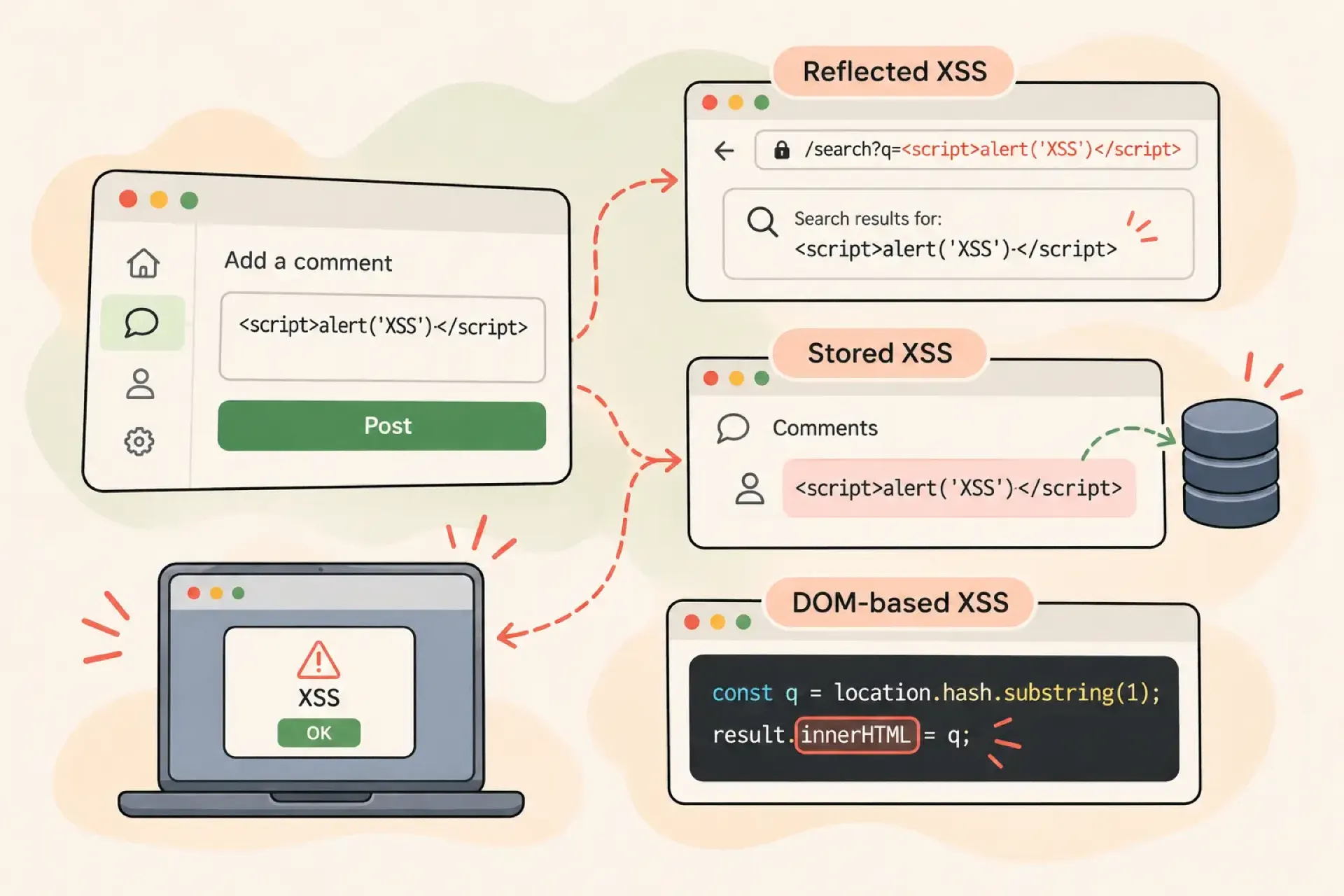
There are three common types of XSS. The names might sound a little intimidating, but they're really just describing how the input gets into the page.
1. DOM-based XSS
This one happens in the browser.
JavaScript takes some input and uses it to update the page in an unsafe way. For example, it might read something from the URL and pass it directly into innerHTML.
That's pretty much what I did in my little experiment. I took the value from an input field and passed it to innerHTML.
The browser didn't just display the characters. It interpreted them as HTML.
Of course, a real application might get that input from a URL, a search box, or somewhere else. The important part is what the JavaScript does with it.
2. Reflected XSS
This one involves the server.
Imagine someone sends you a link with a specially crafted parameter. You open the link, the application receives the input, and the server includes that input in the response without handling it safely.
The browser then processes the response.
One real-world example involved attackers exploiting a known vulnerability in Zimbra webmail. Researchers at Proofpoint reported that the attackers used crafted links to display fake sign-in prompts and attempt to capture credentials and security tokens.
You can read about it here: Proofpoint's report.
3. Stored XSS
This one is interesting because the input doesn't disappear after the request.
Think about a website with a comment section. Someone submits a comment, and the application saves it in the database.
Later, another user opens that page and the application displays the saved comment.
If the application handles that content unsafely, the browser might execute code contained in the comment.
So the same malicious input could affect other people who visit that page. That's what makes stored XSS particularly concerning.
The content doesn't necessarily have to be stored in a database, but that's a common example.
What can actually happen?
You might be wondering why an alert popup is such a big deal.
Well, the alert itself isn't the problem. It's just an easy way to demonstrate that JavaScript has been executed.
In a real application, code running in the context of a vulnerable website could potentially manipulate the page, access information available to that page, or perform actions using the victim's authenticated session.
It doesn't mean the attacker magically gets the victim's login session. But it can give the attacker an opportunity to misuse the victim's access.
What I've learned so far
The three types of XSS are really about how the input travels:
DOM-based: JavaScript handles the input unsafely in the browser.
Reflected: The server sends the input straight back in its response.
Stored: The application saves the input and displays it later.
They're different routes to a similar problem: untrusted input ends up being interpreted as executable content.
For now, one thing I'll keep in mind when working with JavaScript is the difference between textContent and innerHTML.
If I'm displaying ordinary user input, textContent is generally the safer choice. If I actually need to render HTML, then I need to handle it properly, for example by using a trusted HTML sanitisation library.
It's a small experiment, but it helped me understand why something as simple as displaying user input can become a security issue.
I guess that's the interesting part about cybersecurity. Sometimes the problem is hiding in a line of code that looks completely harmless.